Why this move matters now
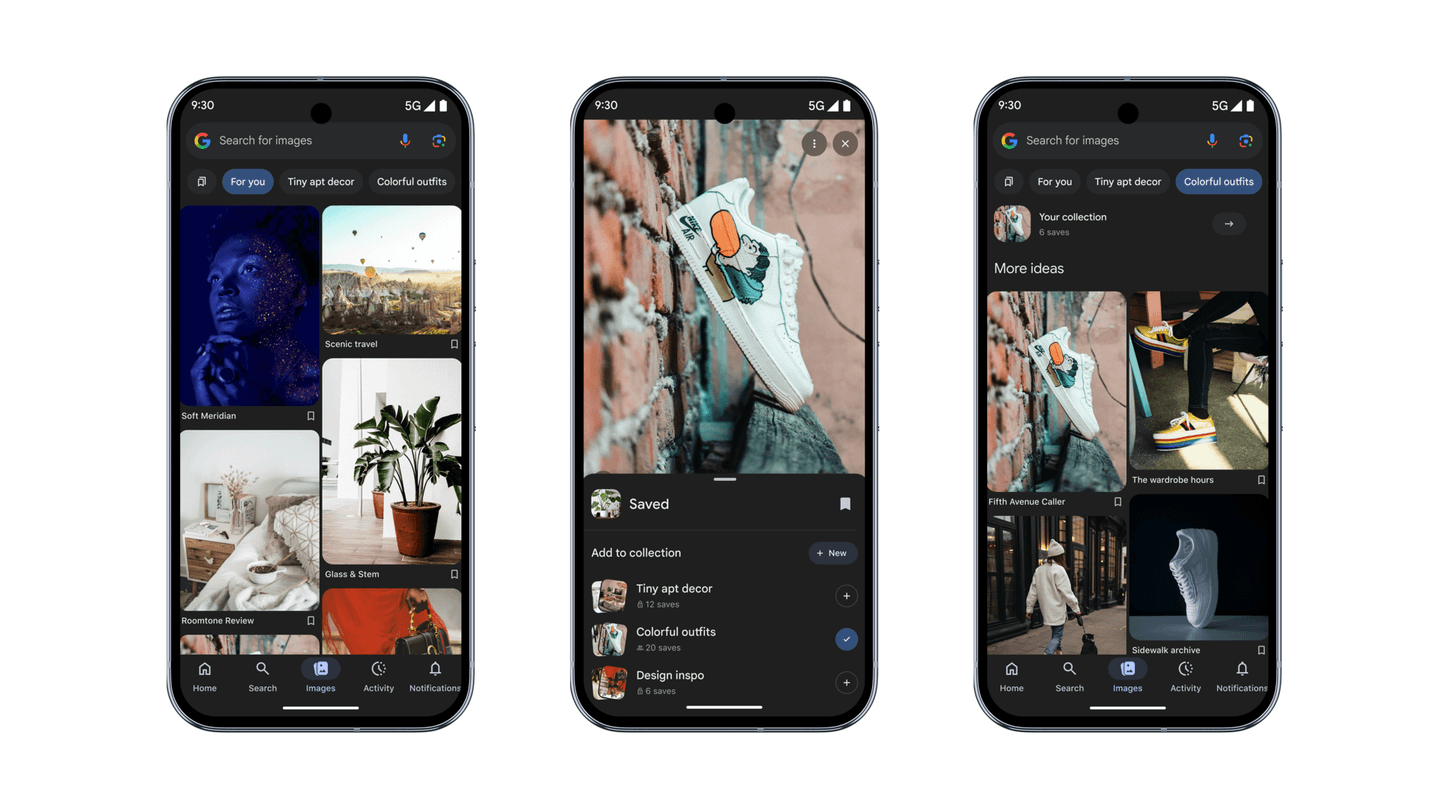
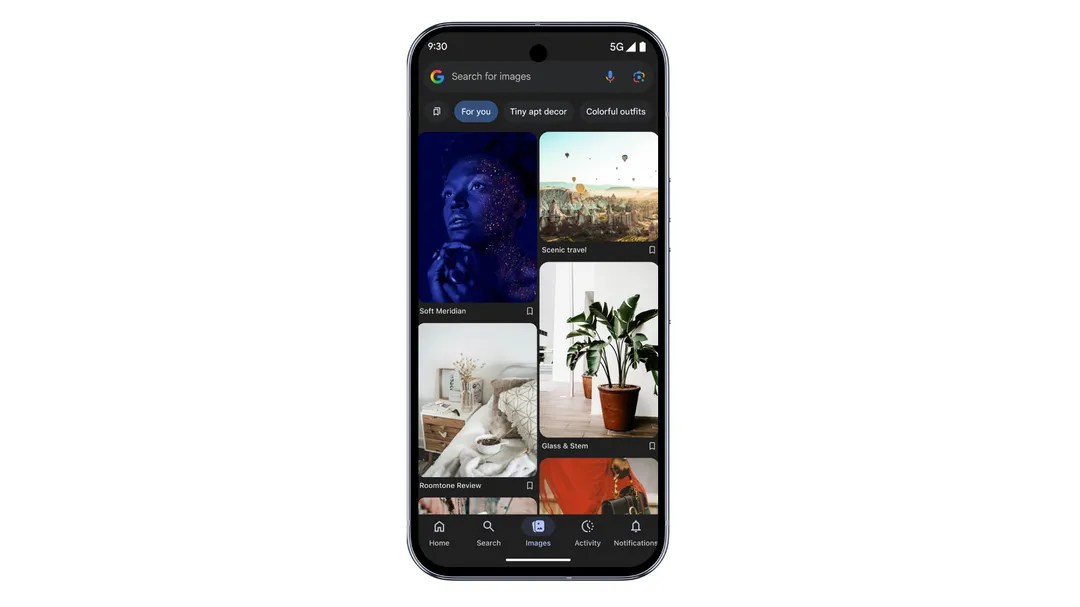
Google has added a dedicated Images tab to its iOS and Android Search app in the U.S., turning the app into a personalized, daily‑updated visual discovery feed. Users can endlessly browse, “search from an image,” and save to Collections, with each image linking to its source site. For operators, this creates a new top‑of‑funnel surface inside Google designed to keep users in the app longer and redirect inspiration use cases away from Pinterest and Instagram.
The business signal is clear: Google is building an owned discovery stream to protect mobile Search engagement and position a fresh ad surface geared to shopping and inspiration. Expect experimentation around shoppable units and retail integrations once usage stabilizes.
Key takeaways for executives
- New engagement surface: A proactive visual feed complements keyword search, aiming to capture “I need ideas” moments without queries.
- Publisher exposure with caveats: Images link to source pages, but CTR and attribution from the Google app may be harder to measure initially.
- Monetization likely: No ad formats announced yet; expect sponsored placements and shoppable product cards once the feed scales.
- Governance watchlist: Personalization relies on Web & App Activity and SafeSearch; copyright, brand safety, and user controls will be scrutinized.
- Rollout scope: U.S. only at launch; UI and ranking signals will likely shift quickly based on engagement data.
Breaking down the announcement
The Images tab lives in the Google app’s bottom navigation. It offers an infinite, high‑resolution image feed personalized from your searches, app activity, and interactions in the tab. Users can tap any image to open a full‑screen viewer, see visually similar results, jump into a new search seeded by the image, save to Google Collections, or visit the source website.
Notably absent are social features: there’s no following, commenting, or messaging. This is deliberate. Google is betting the combination of its web index, Search signals, and Lens‑style similarity search can deliver relevant inspiration without building a social graph. The feed is updated frequently and supports pull‑to‑refresh behavior, mirroring patterns users already know from other discovery apps.
Competitive angle: where it helps, where it lags
Compared to Pinterest, Google’s edge is breadth and intent data. It can pull from across the open web and tie ranking to a user’s cross‑Google activity, not just past “pins.” It also provides native pathways into traditional search and product discovery. The trade‑off: Pinterest’s community and creator ecosystem drive repeat visits, collections, and collaborative planning. Google’s tab is utility‑first and may need ads, shopping, and lightweight collaboration to match session depth.
Instagram’s Explore also competes for inspiration time, but it is video‑heavy and creator‑centric. Google’s Images tab is more web‑to‑publisher oriented, which could benefit brands and media sites if click‑through is strong and previews respect publisher controls.
What this changes for operators
For growth and content teams, the bar for image quality and metadata just went up. Think Pinterest‑grade visuals-clean composition, lifestyle context, and mobile‑first cropping-served from pages with fast load times and clear next steps. For SEO teams, this is less about blue links and more about being the most compelling visual candidate for a feed where users aren’t typing queries.
For advertisers, this is an obvious future venue for shoppable images and product feeds. While nothing is announced, the format lends itself to CPC/CPA units tied to product catalogs and creative variations (e.g., lifestyle vs. cut‑out). Be ready with image‑led creative and a testing plan for when betas open.
Risks and open questions
- Attribution clarity: Apps often mask referer details. Expect early measurement noise; Google may need to expose reporting to win publisher support.
- Copyright and licensing: Wider previews raise fair‑use and thumbnail questions. Publishers should review image licensing and preview directives.
- Quality and safety: The feed will live or die on relevance and spam control. SafeSearch settings and policy enforcement will be tested at scale.
- Cannibalization vs. net new: Will this drive incremental visits, or shift clicks from classic Image Search? Watch traffic mix and session quality.
- Regional compliance: Expansion outside the U.S. introduces consent and transparency obligations that could change ranking signals and ad mechanics.
Implementation details that matter
The feed pulls from across the web and attributes images to source sites. Personalization relies on user activity signals; users can manage this in their Google account settings. Collections provide a lightweight “save” mechanic inside Google, but there’s no external API for retrieving saves, so brands won’t see that signal directly.
For publishers, standard image SEO hygiene will likely influence eligibility: high‑resolution assets (at least 1200 px width), descriptive filenames and alt text, fast LCP for image‑led pages, structured data (ImageObject/Product where appropriate), Open Graph tags, and the max-image-preview:large robots directive to allow rich previews. Avoid heavy text overlays that crop poorly on mobile.
Recommendations (next 30-90 days)
- Run an image audit: Identify your top 50 evergreen pages and upgrade each with 3-5 high‑quality, mobile‑first images, proper alt text, and ImageObject schema.
- Harden measurement: Build analytics segments for Google app referrals; track image‑led landing pages for changes in CTR, bounce, and saves/print proxies.
- Prepare ad creatives: Assemble a shoppable image library (lifestyle and cut‑out variants) and define brand‑safety guardrails for future feed ads.
- Update governance: Reconfirm image licensing, set max-image-preview directives deliberately, and document how SafeSearch labeling applies to your catalog.
- Test for intent bridging: Add clear CTAs (buy, plan, download) on image‑heavy pages to convert inspiration into action without extra navigation.
- Non‑U.S. teams: Monitor U.S. impact before retooling. Localize image strategy only after rollout timing and policy requirements are clear.
Bottom line: This isn’t just another UI tweak. It’s Google staking a claim on visual inspiration time. If you rely on Pinterest or Instagram for discovery, assume a new distribution channel is emerging inside Search-and optimize your images and measurement stack accordingly.